Review: Computer Monitor Mockup for Craft Fairs
As an embroidery designer who has spent countless weekends standing behind booth tables, I have learned that success is not just about the quality of your stitching. It is about choosing designs that stop a customer in their tracks. When I first loaded the Computer Monitor Mockup into my digitizing software, I was looking for more than just a cute icon. I was looking for a versatile machine embroidery design that could bridge the gap between nostalgia and modern utility. This review breaks down how this specific design performs in the real world of handmade sales, focusing on what actually moves inventory at a busy market.
First Impressions and Aesthetic Appeal
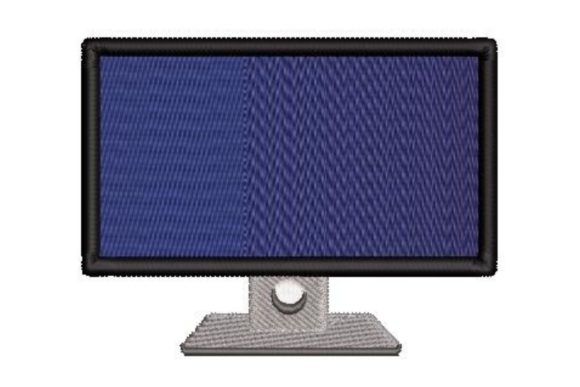
The immediate vibe of the Computer Monitor Mockup is undeniably retro. In an era where minimalism often dominates interior design, there is a growing counter-movement celebrating the chunky, beige aesthetics of early computing. This design taps directly into that nostalgia. It feels playful yet structured, making it a perfect candidate for customers who appreciate IT culture, vintage tech, or simply a quirky, modern twist on home decor. Unlike overly complex floral patterns that require close inspection, this graphic is bold and instantly recognizable from three feet away. That instant readability is crucial for a craft fair product, where you have seconds to capture attention.
While the product category is listed under Back To School, which makes sense for students heading into computer science or graphic design programs, the appeal extends far beyond the classroom. It fits seamlessly into the "geek chic" aesthetic that is popular among young professionals and remote workers. As an Embroidery piece, it offers a clean, digital look that contrasts beautifully with the organic texture of natural fabrics.
Product Versatility and Market Fit
The true test of any digital embroidery file is its adaptability. I evaluated this design across several potential products to see where it shines brightest. Here is how it performs on common handmade items:
- Tote Bags: This is arguably the strongest application. A canvas tote with the Computer Monitor Mockup centered on the front becomes an instant statement piece. It works exceptionally well as a tote bag design for teachers, programmers, or students. The graphic nature of the monitor looks intentional and stylish rather than accidental.
- Aprons and Kitchen Textiles: For the home office worker who also loves to cook, an apron featuring this design adds personality. However, for tea towel embroidery, you must be cautious. Ensure the design is not too dense, as tea towels have a loose weave that can distort detailed stitches.
- Embroidered Patches: If you are looking to create low-commitment impulse buys, turning this into an embroidered patch is a smart move. Patches allow customers to customize their own jackets or bags, increasing the perceived value of a small item.
- Caps and Headwear: Placing this on a curved cap surface requires careful hoop placement. The rigid lines of a computer monitor can look distorted if not centered perfectly on the crown. It works best on structured caps rather than unstructured dad hats.
For Etsy seller accounts, this design also serves as an excellent visual anchor for printable mockup listings. Even if you are selling the physical item, using high-quality images that highlight the retro charm can significantly boost click-through rates.
Production Practicality and Stitch Quality
From a production standpoint, efficiency is key. When preparing for a weekend market, you need designs that are repeatable and reliable. The Computer Monitor Mockup generally features clean lines and solid fills, which suggests a manageable stitch count. However, as a professional, I always advise checking the stitch density before running a full batch. High-density areas on thick fabrics like denim or canvas can cause puckering if not properly stabilized.
One critical consideration is the hoop size. You must confirm that the design fits within your standard hoops without requiring excessive re-hooping, which slows down production. Additionally, review the thread colors carefully. While the default colorway might be classic beige and gray, experimenting with pastel threads or high-contrast neon can modernize the look for a younger demographic. Always test the design on scrap fabric first. This allows you to inspect spacing and ensure that any small details, such as screen pixels or button icons, do not get lost in the fabric grain.
Navigating Fabric and Stabilizer Challenges
The interaction between the needle and the material defines the quality of your finished product. For this design, I recommend using a cut-away stabilizer for stretchy fabrics like t-shirts to prevent distortion over time. For woven fabrics like cotton tote bags, a tear-away stabilizer is usually sufficient, provided the stitch density is not excessive. Be mindful of fabric texture; highly textured materials like terry cloth or heavy linen can obscure fine details. If you are embroidering on dark fabric, ensure you use a topping or choose thread colors with enough brightness to stand out against the background.
Small lettering or intricate details within the monitor screen area may lose clarity if the design is scaled down too much. If you plan to use this as a small accent on a pocket or a pouch, verify that the smallest elements remain distinct. If they merge together, consider simplifying the design or increasing the overall size.
Boosting Brand Consistency and Sales
Incorporating the Computer Monitor Mockup into your lineup can strengthen your brand identity if you position yourself as a maker of witty, modern, or tech-inspired goods. It adds variety to a booth that might otherwise be dominated by floral or farmhouse styles. This contrast draws in a different segment of buyers, expanding your customer base. Furthermore, because the design is graphic and clean, it photographs exceptionally well for online listings. Clear, crisp images of the embroidery help convey the handmade product quality, reducing hesitation for online buyers.
When displaying these items at a fair, group them by theme. Place the monitor-emblazoned tote next to a matching mug or notebook if you sell mixed media items. This creates a cohesive vignette that tells a story about the modern worker or student. It encourages buyers to purchase multiple items as a gift set, increasing your average transaction value.
Final Designer Notes and Licensing
Before you commit to large-scale production, there are administrative and technical checks to complete. First and foremost, confirm the commercial licensing terms. Not all design assets allow for unlimited sales of finished goods. Ensure you have the right to use this commercial embroidery file for the volume of products you intend to sell. Second, check the file formats included in the download. You want to ensure compatibility with your specific embroidery machine to avoid conversion errors that can alter stitch paths.
Finally, create at least one real-world mockup or sample product to display at your booth. Customers are more likely to buy when they can see and touch the quality of the stitching. Feel the back of the embroidery to ensure it is not scratchy, and check the tension to guarantee durability. By treating the Computer Monitor Mockup with the same rigor as any high-end design, you transform a simple digital file into a profitable, eye-catching staple of your small shop product lineup.